Curriculum
Content Posting
Fail to Plan – Plan To Fail
0/3

Scheduling Tools
0/4
Content Engagement
0/3
Insights & Analytics
0/1
One Piece of Content Different Platforms
Running a business is hard work … but when you add social media to the mix, it’s an entirely new ballgame. So, how can you balance running your business, showcasing it on social media, and SAVE TIME?
You create one piece of content … and tailor it for each social platform.
It’s working smarter, not harder…and meeting prospective customers on the platform they prefer. Essentially by resizing or reusing the content you’ve already created for other channels or purposes.
This can be as straightforward as sharing your latest TikTok on Instagram, YouTube Shorts, and Facebook. But you can also reshare older content that did well elsewhere. One thing to keep in mind, though, is that original content tends to do better on most platforms.
What do I mean by “original?” Traditionally, original content is anything you’ve created yourself. However, social media algorithms interpret it a little differently. Platforms like Reels and YouTube Shorts are trying to differentiate themselves from TikTok, so they actively deprioritise content with watermarks from other platforms.
Edit Social Videos in Your Browser or Canva Instead of Inside the Actual App
Although Reels, YouTube Shorts, and TikTok all have their own video editing tools, if you create the content inside of the app, you can’t save the file directly to your phone without the social platform watermark. Also sometimes the mobile app editing suites are difficult to use.
How to Download Your Social Media Posts Without the Watermarks
If you want to reuse older content that you’ve already made using the TikTok native editor, don’t worry. Instead of saving directly from the app, copy the share URL for the video instead. Head over to Kapwing.com. You’ll see the option to upload a video from a URL. Paste your video link there and Kapwing will grab your video from the link, without watermark.
How to Resize Content for New Platforms
Reusing existing content is great if you’re taking content from one vertical video platform to another, but sometimes it’s not that straightforward. Even with the recent focus on short-form, vertical video, if you’re creating content for multiple different channels, there’s going to be some variation in video dimension and size.
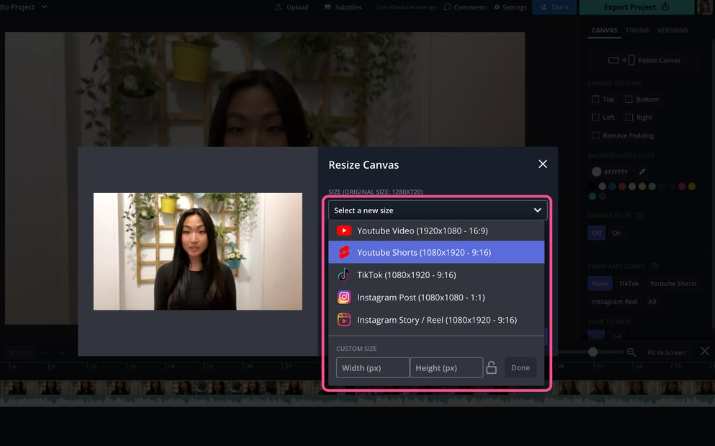
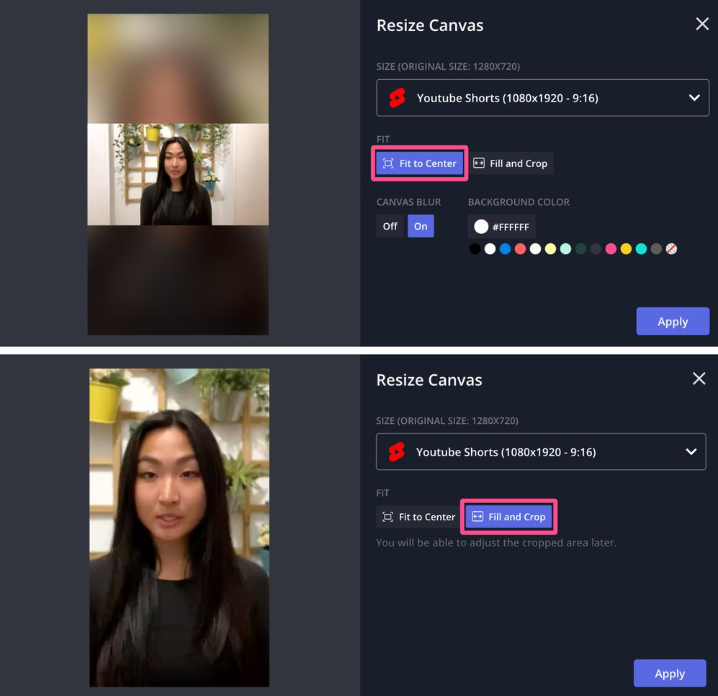
You can either import into Canva and use the resize option … or again copy the URL in Kapwing and click the “Resize Canvas” button in the right side menu. By resizing your horizontal video for vertical platforms, you’re getting new life out of old and existing content and cutting your work in half. Also depending on the type of recording or image taken you can use the option of “Fit to Center,” with or without background blur, or “Fill and Crop.” Choose the one that best fits the kind of content you create. Using the “Fill and Crop” option, so it looks most like videos filmed natively on vertical platforms.
In an earlier lesson I covered keeping the social media profile for your franchise consistent with the David Reid Homes brand yet the one thing that is guaranteed is that everything on Social Media changes. However, there are standard types of content that can carry across the different Social Media channels. They are:
- Short Form Video or Reels – 30second to 90 second video for TikTok, Instagram and Facebook. 60 seconds for YouTube shorts.
- Single Photo Posts. – square for Instagram, 4:3 for Facebook
- Carousel Photo Posts. – up to 10 images square for Instagram and TikTok
- Long Form Video Posts – up to 60 minutes for Instagram and Facebook, 10 minutes TikTok
- Live Videos – same as long form video
- Stories – 60 seconds for Instagram and YouTube Shorts, 120 seconds for Facebook
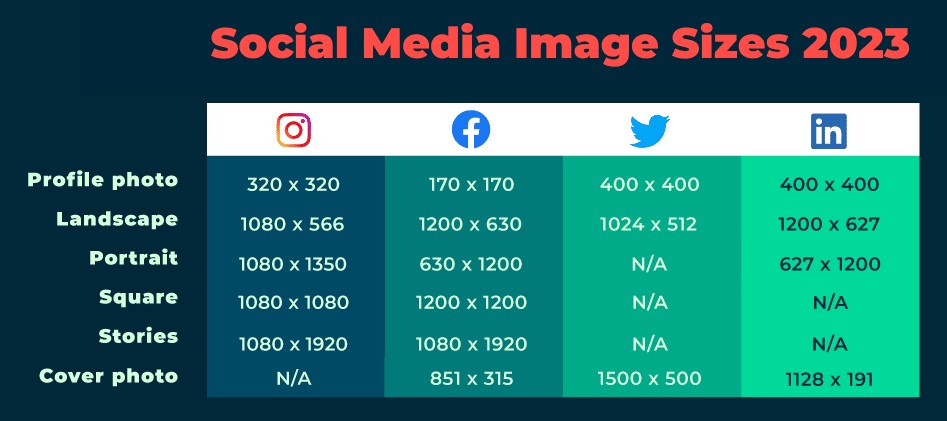
Taking advantage of tools such as Canva & Kapwing makes it easy to create once and resize and reuse across all the Social Media platforms you choose to use.
Next Lesson: Using Canva’s Scheduling Tool

