Curriculum
Content Posting
Fail to Plan – Plan To Fail
0/3

Scheduling Tools
0/4
Content Engagement
0/3
Insights & Analytics
0/1
Comments & Invites
You’ve heard quite often throughout these trainings that Social Media is SOCIAL! Its all about engagement and building relationships. So dumping posts and not engaging is a sure fire way to make sure your Social media feeds are a barren wasteland.
Human beings are by nature incredibly self-absorbed and often look at any form of marketing with a “what’s in it for me” attitude. In fact, humans devote about 30–40% of all speech to talking about themselves. But online that number jumps to about 80% of social media posts. That’s a huge jump! Interestingly 62% of people say they feel better about themselves when people react positively to what they post on social media.
When a user comments on your brand’s content, don’t take it lightly. That engagement can help you get to know your customers more than ever. There are lots of places a user can post a comment. Social media has become a customer service channel of sorts, so users are increasingly reaching out to companies via private messages or public comments on social media pages, hoping someone will respond.
Every social media channel allows users to leave comments. You’ll usually get a notification when someone leaves a comment on a post so you can check it out and reply. It’s a good idea to assign someone to moderate comments and know how to appropriately respond to them so that you never miss an opportunity to reinforce your brand.
Assigning someone to manage your comments on social allows you to be as responsive as possible. Here are general rules of thumb:
- Respond to all positive feedback, no matter how great or small. Every nice compliment is an opportunity to strengthen your customer relationships.
- Respond to neutral feedback in a positive way. A simple “Thanks for sharing!” often does the trick, but make sure your response is relevant to their comment.
- Respond to genuine complaints. Most negative feedback is valid and they will appreciate you taking the time to try to make the situation right. And don’t forget – the person who made the complaint isn’t the only one waiting for a response!
- Respond to crisis situations. In some cases, you may have to involve third parties, such as your local law enforcement when comments involve a threat. Screenshot the comment, then remove it and address it accordingly.
- Don’t respond to spam or troll comments. Engaging with trolls isn’t going to do your brand any favours since they feed off attention and don’t really care what you have to say. Even deleting their comments will only stoke the fire.
Instagram DMs (Direct Messages)
Instagram has become one of the top social media customer service channels. People are increasingly reaching out to brands in DMs with questions or expectations of customer support. If a follower sends a message to your inbox, you need to be prepared to respond.
To respond in a DM, hover your mouse over the specific message and click the curved arrow. This allows you to reply to that message. Type your message in the text box and click Send.
DMs are also helpful if you do not want to publicly respond to a comment. Simply reply to their comment that you’ve sent them a DM and then handle the rest behind closed doors. For example, if a customer commented that they still haven’t received their order from you, you wouldn’t want to share their tracking link or ask for personal details that other people could see.
Instagram Posts and Instagram Videos
Comments made on IG posts are viewable by the public. These need to be moderated and replied to promptly, especially if they contain negative content that may impact others’ impressions of your brand.
To respond to comments on a specific post, navigate to the post (via desktop or mobile app) and scroll down to the comment section. Click Reply on the comment you want to respond to. Type your thoughts and click Send.
What to Say in Your Response
It’s important to consider how your comment will appear to others. Remember — your reply might also be public to others!
Responding to positive comments is easy — just match the customer’s level of excitement. Neutral comments are easy, too. Toss in an emoji or two to make it more colourful. Negative comments … that gets a whole lesson on its own!
Using Business Suite
Meta make it super easy to invite people to like your page via Business Suite once they have started to engage with your page.
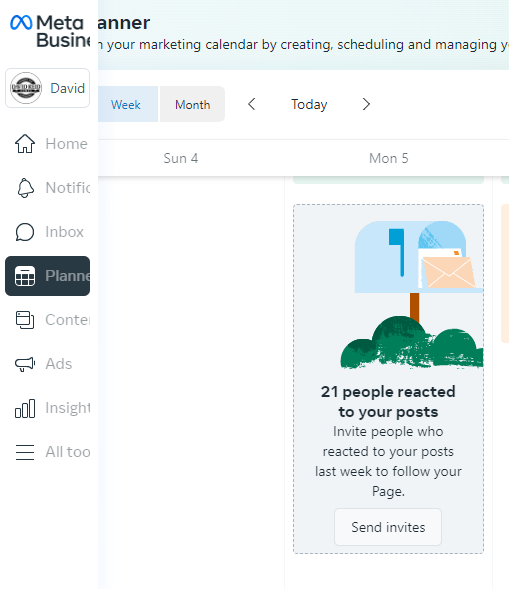
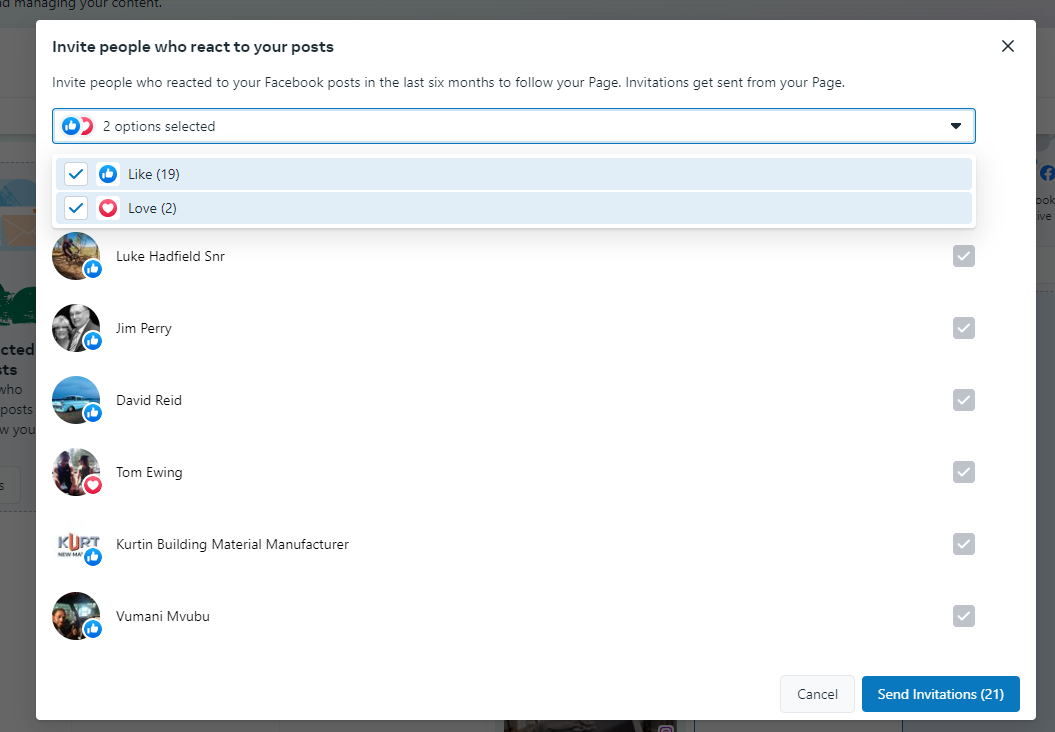
Growing Your Followers
Engaged followers can be a great foundation for your custom audiences. In Meta Ads Manager, you can build custom audiences based on people who have engaged with your account. If you’ve turned comments into DMs, you can also target people who have messaged your business directly.
Quite often you have to encourage followers to provide the engagement you want. Otherwise, followers are likely to double-tap and keep scrolling, leaving you with far fewer comments than you’d like.
To get your audience to comment, be direct. Include calls to action (CTAs) in your captions, telling followers exactly how you’d like them to react to your content.
Prompt Followers for Feedback on Business-Related Topics
One way to generate engagement is to ask your followers for their opinion on something as low-stakes as possible—but make it relevant to your business.
Next Lesson: Handling Negativity

